GoLongtail Page Review · free beta
Find what your product page is missing — and what to fix first
Paste a product or feature page. You get a scored review of what buyers and AI assistants can and can't learn from it, the fixes ranked by impact, and an implementation brief your team can build from.
Runs in your browser, nothing to install. The page's text and screenshots are sent to Google's Gemini model to judge the page; GoLongtail doesn't use your page data to train models. How page data is handled
 What you get, from a real reviewGavel Exec's page scored 80.5 overall in a quick review. First issue found: Capterra rating aggregates all Gavel products rather than Gavel Exec.See the sample review
What GoLongtail Page Review does
GoLongtail Page Review is a free tool for B2B software marketing and product teams. It reads one product or feature page the way a buyer, and the AI assistant they ask, would read it, scores it on six areas, and turns the gaps into ranked fixes and an implementation brief your team can build from. After you publish changes, it checks the updated page and shows what moved.
The six areas: content (does the page answer what a buyer asks), conversion paths (can they try, buy, book a demo or ask), layout, readability for AI assistants, visuals, and loading speed.
Cost, time and what you need
- Cost
- Free during the beta
- Up to 5 reviews per day. No account, no card.
- Time
- Several minutes per page
- Each competitor page adds several more.
- You need
- A public page URL
- Optional: up to 4 competitor pages, your product name and audience.
Review my pageFree, takes several minutes, no sign-up.
When GoLongtail Page Review fits
Use it when
- you're about to rewrite, relaunch or launch a product or feature page;
- buyers or AI assistants describe your product wrongly, or can't find your price or fit;
- you want to see how your page compares with up to four competitor pages;
- your team can change the page (CMS access or a developer).
It's not the right tool when
- the page is behind a login;
- it's a homepage, blog post or help article (the rubric is built for product pages);
- you need to measure conversions or revenue — use analytics or an A/B test;
- nobody can change the page.
How it works, and what you get at each step
- 1
Benchmark the page · several minutes
A scorecard on six areas, a map of your page's sections, and the quotes behind every score.
See it in the sample review - 2
Rank the fixes · under a minute
The top three fixes first, each with what's wrong, what to change and an estimated score gain, plus what a page change can't fix.
- 3
Build the implementation brief · 1–2 minutes
A proposed reference page, copy deck, claim register, structured data and a prompt for your coding agent. Nothing is published.
 See it in the sample review
 - 4
Check your updated page · about 1 minute
Once your team has shipped the changes on a staging, preview or live URL, every proposed change is checked on that page.
- 5
Re-benchmark and compare · several minutes
The same rubric on the updated page, with a before/after view of scores, fixed issues and remaining gaps.
You decide at each step whether to continue. Steps 4 and 5 only start once you give the URL of the updated page.
Review my pageStart with step 1; you decide on the rest later.
Sample review: what you get, from a real page
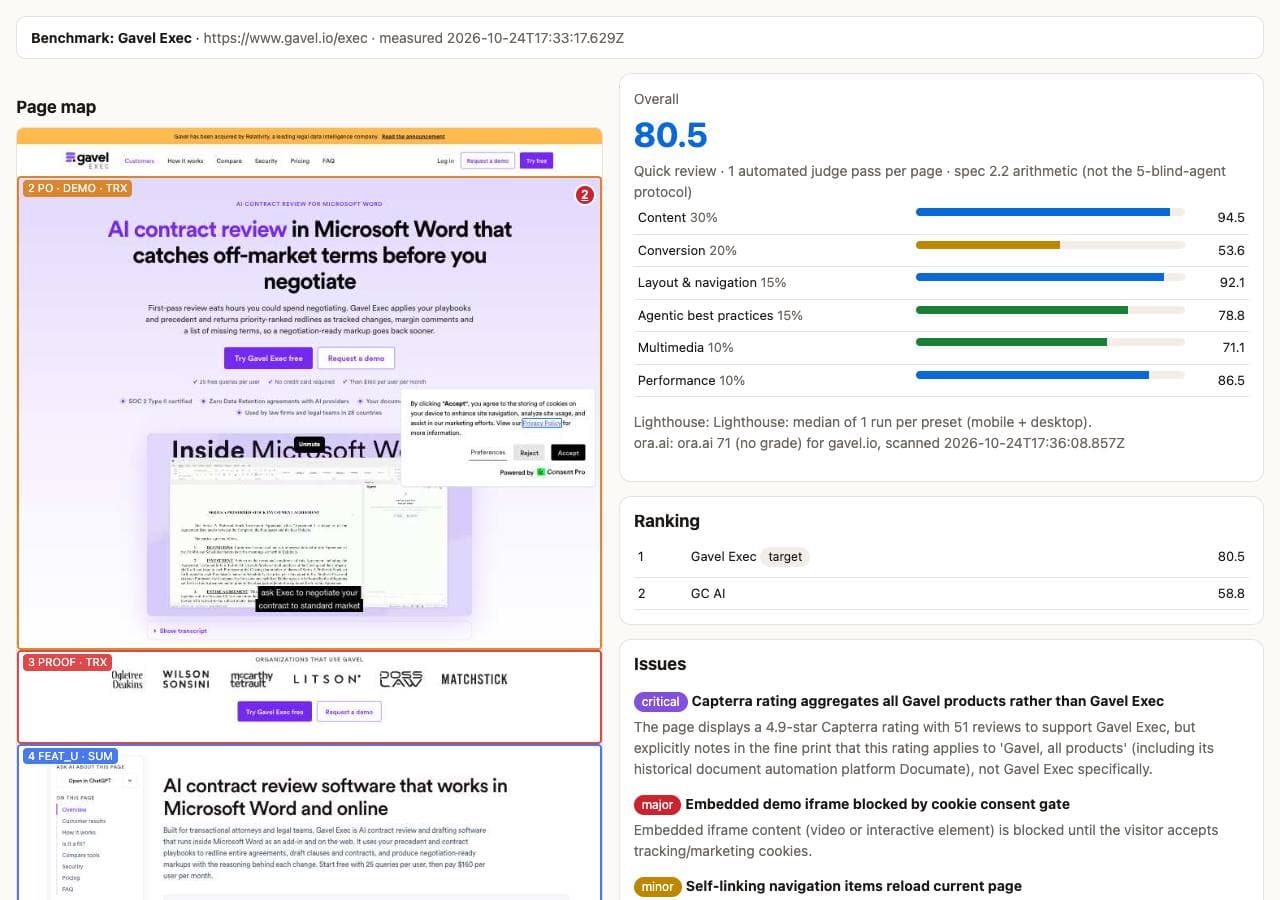
Sample data: GoLongtail Page Review of the public product page gavel.io/exec (Gavel Exec, an AI contract review add-in for Microsoft Word), run on 24 October 2026 as a quick review (one judging pass, one speed test per device), compared with GC AI's commercial-contracts page. Everything below is copied from that review's output.
1 · The scorecard
Overall score, 0–100
80.5
Ranked 1st of 2 pages reviewed.
Run-to-run variation: a second quick review of the same unchanged URL on the same day scored 77.1. Differences of a few points between single quick reviews may be noise; a standard review averages three passes.
| Content | 94.5 |
| Conversion paths | 53.6 |
| Layout | 92.1 |
| Readable for AI assistants | 78.8 |
| Visuals | 71.1 |
| Speed | 86.5 |
2 · The top three fixes, in the review's words
Trust blockerCapterra rating aggregates all Gavel products rather than Gavel Exec
What's wrong: The page displays a 4.9-star Capterra rating with 51 reviews to support Gavel Exec, but explicitly notes in the fine print that this rating applies to 'Gavel, all products' (including its historical document automation platform Documate), not Gavel Exec specifically.
What to change: Correct or remove it where it appears (5 Customer Results & Case Studies), so the page, its markup and any AI-facing files say the same true thing.
Estimated score gain: none on its own. Issues are reported separately from checklist points; fix it because it can mislead buyers and AI assistants.
Trust blockerEmbedded demo iframe blocked by cookie consent gate
What's wrong: Embedded iframe content (video or interactive element) is blocked until the visitor accepts tracking/marketing cookies.
What to change: Correct or remove it where it appears (2 Hero Section), so the page, its markup and any AI-facing files say the same true thing.
Estimated score gain: none on its own. Issues are reported separately from checklist points; fix it because it can mislead buyers and AI assistants.
Buyer order & first screen: Reorder sections into the buyer's decision order
What's wrong: Sections don't follow the order buyers decide in: problem, summary, pricing and fit, proof, demo, then features and questions.
What to change: Move the summary and pricing/fit up, before the feature details; keep proof and the demo ahead of the long feature list.
Estimated score gain: about +0.9 (an estimate from the same rubric, not a measurement).
If every fix a page change can make landed, the estimate was about 85.4. The review also listed what a page change can't fix, such as the sign-up flow and demo booking.
3 · An excerpt of the implementation brief
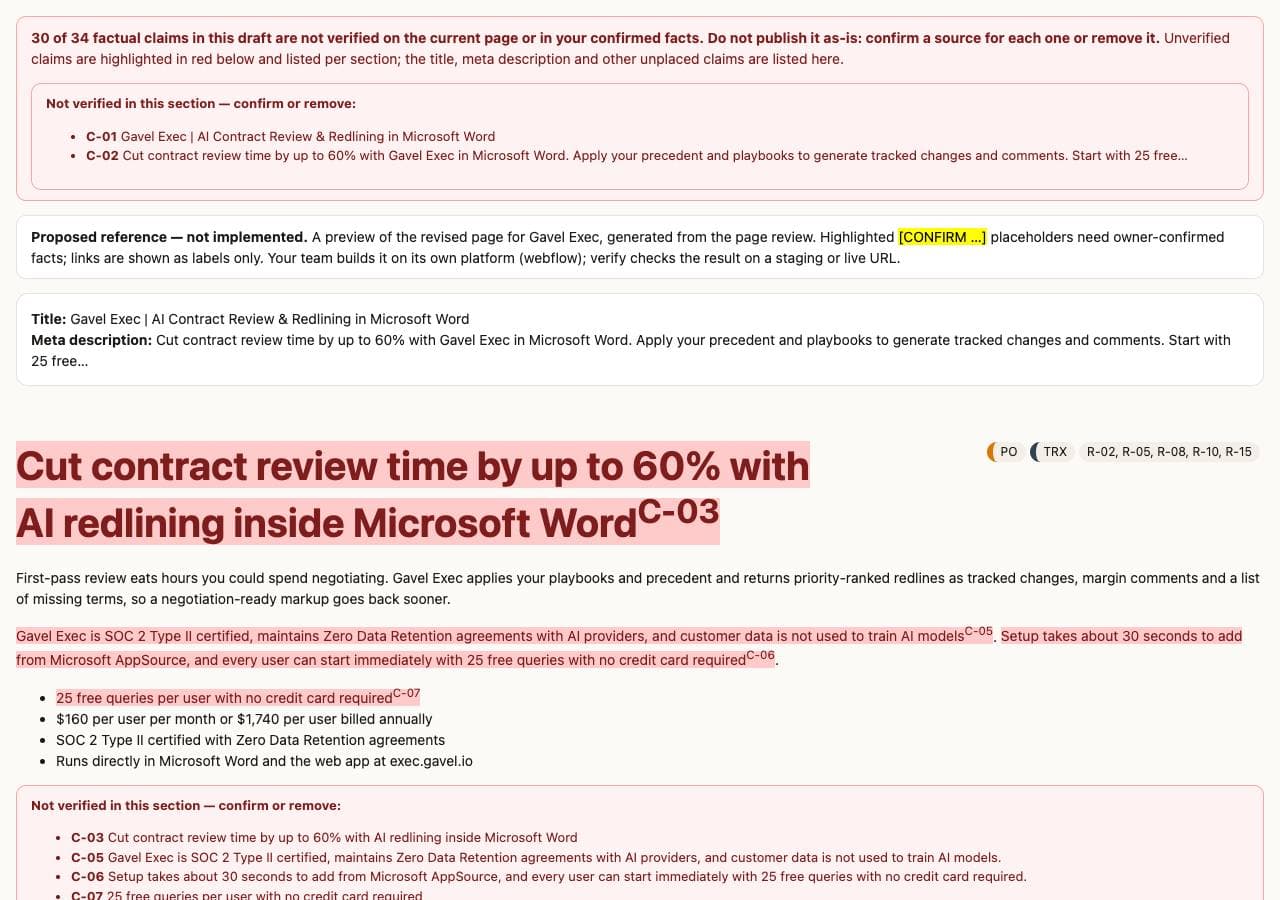
A proposal, not implemented: the brief is written from facts on the page and the owner's confirmed facts, and every claim is listed in a claim register (4 verified on the page, 30 to confirm with a source before publishing).
Proposed headline: “Cut contract review time by up to 60% with AI redlining inside Microsoft Word”
Proposed summary: “Built for transactional attorneys and legal teams, Gavel Exec is AI contract review and drafting software that runs inside Microsoft Word as an add-in and on the web at exec.gavel.io. It uses your precedent and contract playbooks to redline entire agreements, draft clauses and contracts, and produce negotiation-ready markups with the reasoning behind each change. You can get started with 25 free queries per user without entering a credit card, and paid access is available at $160 per user per month.”
First changes in the change map
- Remove non-specific Capterra rating badge (removed)
- Remove cookie consent blocked demo iframe (removed)
- Reorder sections to strict buyer order (moved)
- Ensure all FAQ answers explicitly restate Gavel Exec (modified)
- Expand visual format variety across sections (added)
The brief has 9 sections, a copy deck, structured data, a prompt for a coding agent and 115 checks that are run on the updated page.
Explore the full sample (read-only, no sign-up)
- Full report — scorecard, page map, evidence per area, fixes and coverage
- Page map and evidence
- Proposed reference page — with unverified claims highlighted
- Before/after review — a re-run of the same unchanged URL, which shows run-to-run variation
- All fixes (Markdown) · Copy deck · Claim register
A different method, for context: on 23–24 October 2026 GoLongtail scored the same page with a manual protocol (the same rubric applied in five independent runs by AI agents following a fixed written spec): 61.1 before and 77.3 after a rebuild based on its findings. Those scores measure how completely the page answers buyers against the rubric, not conversions or revenue, and they are not directly comparable with the automated quick review above.
Review my pageGet the same review for your page.
GoLongtail Page Review compared with the alternatives
| GoLongtail Page Review | Manual audit (consultant or in-house) | Lighthouse or PageSpeed alone | |
|---|---|---|---|
| What it checks | Buyer content, conversion paths, layout, AI readability, visuals and speed | Whatever the reviewer covers | Speed, accessibility and technical SEO only |
| Time to first result | Several minutes | Varies by scope and reviewer | About 1 minute |
| What you get | Scorecard, ranked fixes, implementation brief, check of the updated page | A report, often with expert judgement and context | A performance report |
| Limits | Automated judge; one page at a time; can't test sign-up or checkout past the first form | Cost, and results vary by reviewer | Doesn't read what the page says |
GoLongtail also offers an AI search audit that benchmarks your whole site against competitors in Google and AI answers. See pricing for the paid plans.
What happens to your page data
- GoLongtail Page Review reads only the public page you give it, plus its robots.txt and llms.txt files.
- The page's text and screenshots are sent to Google's Gemini model to judge the page; GoLongtail doesn't use them to train models.
- The review is stored so its link keeps working. Anyone with the link can read the results; only the browser that started it can run the next steps.
- To have a review deleted, email support@golongtail.ai with its link.
How the scores stay honest
- Every point needs evidence: a quote found on your page or a measured check (structured data, links, robots.txt, speed). A quote that can't be found on the page earns nothing.
- Missing measurements stay "pending" instead of being guessed.
- Estimated gains are labelled as estimates and computed with the same rubric.
- The brief only uses facts found on your page or confirmed by you; everything else is marked "confirm".
Questions about GoLongtail Page Review
Which pages does GoLongtail Page Review work on?
Public product or feature pages of B2B software. Pages behind a login can't be read, and homepages, blog posts and help articles don't fit the rubric, which is built for product pages.
Do I need an account or to install anything?
No. GoLongtail Page Review runs in your browser: paste the page URL and start. There's no account, card or install, and the review link keeps working so you can come back to it.
Can I compare my page with competitors?
Yes, with up to four competitor pages. Each adds several minutes, and the scorecard shows where they do better.
Does GoLongtail Page Review change my website?
No. GoLongtail Page Review only reads public pages. It never submits forms, signs up, accepts cookies or publishes anything; your team makes and publishes the changes.
How long does a GoLongtail Page Review take?
A quick review of one page usually takes several minutes: the page is captured, measured with Lighthouse on mobile and desktop, and scored in one automated judging pass. Each competitor page adds several minutes. A standard review scores every page in three judging passes (inside the same benchmark step, not extra steps) and runs more speed tests, so it takes longer.
How reliable is the GoLongtail Page Review score?
GoLongtail Page Review applies a fixed 6-area rubric with an automated judge. Every point needs evidence: a quote found on the page or a measured check (structured data, links, robots.txt, speed); a quote that can't be found on the page earns nothing. A quick review is one pass, so the same page can move a few points between runs; run a standard review before reading much into small differences.
Will GoLongtail Page Review increase my conversions or revenue?
GoLongtail Page Review doesn't measure conversions or revenue. It measures how completely and clearly the page answers buyers and AI assistants against its rubric. Use analytics or an A/B test to measure business impact after you ship.
Review your product page
Free, takes several minutes, no sign-up. You get the scorecard and the top fixes first.
Paste your page URL